

What happens when we search for anything on GPT, Llama or Gemini? It quickly understands our thinking and gives the actual result, even if there are no exact text matches. This gap is fulfilled with a vector database.
I will guide you through the basic to intermediate level usage of vector DB with a simple project working. Also, we will go through the actual meaning and usage of ChromaDB, Hugging Face, RAG and relations between them.
Let us first start with the understanding of the terms used:
What is a Vector Database?
A vector database is a specialised storage system that calculates and stores data in mathematical format in the form of arrays of numbers called vectors or embeddings.
It looks like:[0.89, 1.542, 1.88,….]
Instead of searching for the exact keyword matches, it performs similarity searches for the highly relevant, conceptually and semantically related data.
Vectors are sometimes memory-heavy. We can store a small number of vectors in RAM.
For 100k vectors × 384 dimensions × float32 (4 bytes) = ~150 MB (approx)
But for 1000k+ document records can consume GBs of RAM, which can pull down the production environment. Production vector database uses ANN (Approximate Nearest Neighbour) algorithms like HNSW to optimize memory and speed.
How is it different from a traditional database like MongoDB or SQL?
In traditional DBs like MongoDB and MySQL, we usually expect the system to retrieve the exact result for the exact query. But in the vector db we get the response based on the similarity of the query. Consider that if you have searched for “puppy,” you may get a response for “dog” too, even if the query doesn’t match, because both words are semantically correct.
RAG and Recommendation systems are based on Vector DB only.
What are embeddings?
Embeddings are the array of numbers (the vector) that represents the meaning of the data. Now data can be in any format, like Text, Images, Audio or Video.
The two points or numbers that are closer to each other in multi-dimensional space are considered to be of more meaningful or of close relations.
What is Chroma DB?
Chroma DB is a free, lightweight, open-source vector database under theApache 2.0 license used in creating AI-based applications. It is primarily used to store and search embeddings and their associated metadata. It is designed to act as “long-term memory” for LLMs and AI apps. Chroma DB is completely different from SQL and NoSQL.
This looks similar: [0.89, 1.542, 1.88,….]. At the end, this is also a vector.
Here is the chroma db documentation link: https://docs.trychroma.com/docs/overview/getting-started#python
What is Hugging Face and its usage?
Hugging Face is a company and open-source platform that stores thousands of pre-trained machine learning models, spaces and datasets, often known as “Git for AI/ML”.
It is used in providing embedding models that will convert text or images into numerical vectors that is required by vector database.
Implementation of Vector Database for RAG
Now, with an example, let’s understand how the relation between Vector, Chroma DB, and Hugging Face works to create a RAG application. I will walk you through each block and the usage behind it.
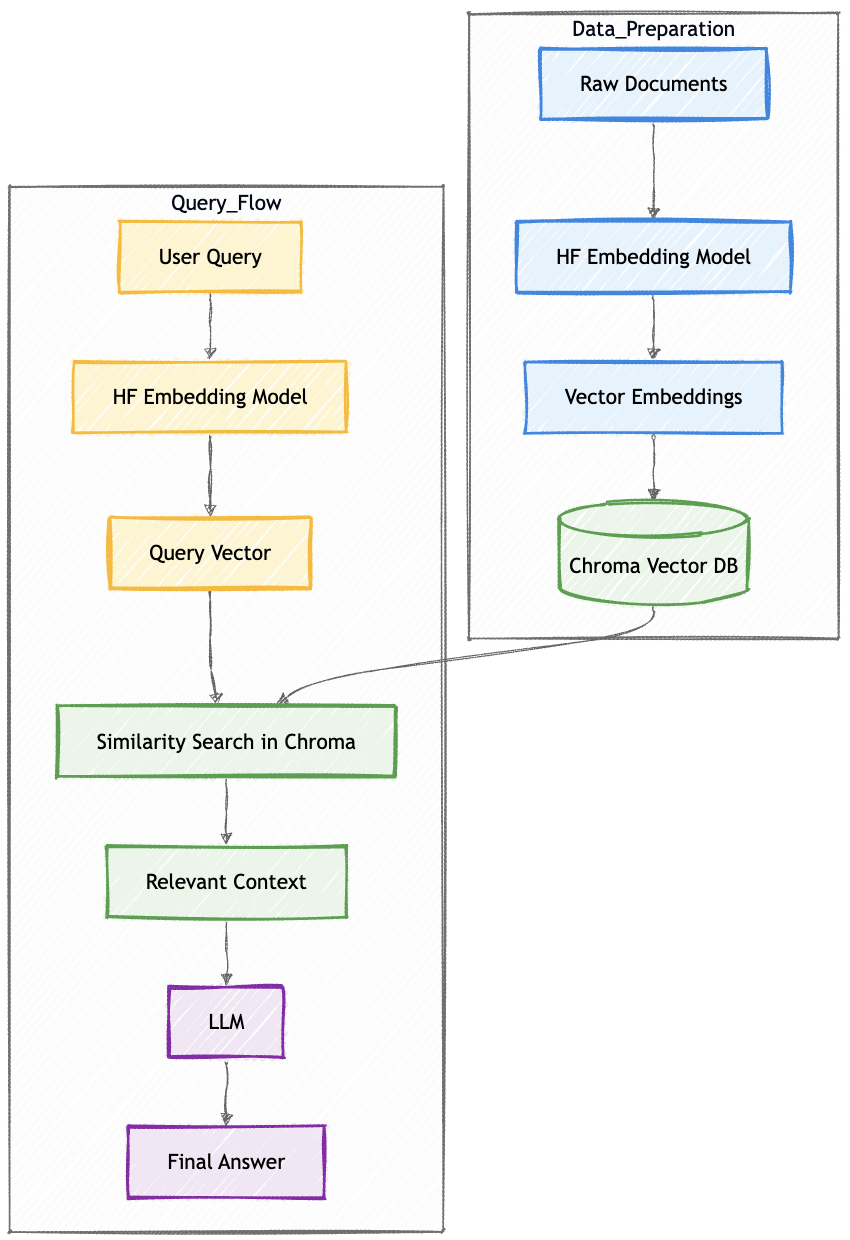
In this, the user gives an input, and our AI will answer with relevant information.
The end goal for both the blocks Data Preparation and Query Flow (see above figure) is to generate vectors somehow and compare the vector distance; the lesser the value, the more relevant/correct answer considered. Consider an example of searching data out of thousands blog documents.
Data Preparation
Data preparation will help us to find out the relevant blog. Let us deep dive into the process.
Raw Documents
This is the source of truth in the form of blog content(text format), which we will first convert into numerical array vectors, because we require finding information from these blogs only.
documents = [
    "RAG stands for Retrieval Augmented Generation.",
    "Vector databases store embeddings for similarity search.",
    "Large Language Models generate text responses."
]
HF Embedding Model (Hugging Face)
Now that you have large documents, you pass this text to the embedding model hosted on Hugging Face. In return, the embedding model processes the text and provides a high dimensional vectors (which has some meaning hidden in it).
Some of the popular models are:
all-MiniLM-L6-v2, BGE, E5 Models, GTE (General Text Embeddings)
Example:
“What is RAG?”
↓
[0.12, -0.98, 0.45, … 768 values]
from sentence_transformers import SentenceTransformer

model = SentenceTransformer("all-MiniLM-L6-v2")
Vector Embeddings
These are high-dimensional numeric arrays of 384 dimensions, 788 dimensions or 1000+ dimensions. Each dimension recognises the pattern in the language space.
If two vectors are closer in the space, they are considered more similar. Now these close points are calculated using metrics like Euclidean distance, Cosine Similarity, and Dot Product. All these are mathematical foundations used in RAG.
doc_embeddings = model.encode(documents)

print(doc_embeddings.shape) # (3, 384)
This means we have 3 documents, each converted into 384 dimensions.
Example of one embedding. Actual numbers can be different.
print(doc_embeddings[0][:5]) # [ 0.021 -0.114 0.392 0.884 -0.221]Chroma DB
At this point, Chroma DB will store blog documents in the form of Embeddings (vectors), Original Text, and Metadata (like date, author). You can store this in the local system also.
Here is how we store in Chroma DB:
import chromadb

client = chromadb.Client()
collection = client.create_collection("rag_demo")

collection.add(
    documents=documents,
    embeddings=doc_embeddings.tolist(),
    ids=["1", "2", "3"]
)

print(collection.count()) # 3
Query Flow
Now, here we will see when the user gives input as a query, and our system will answer with the help of AI.
User Query, HF Embedding & Query Vector
This is an input question from the user. Like:
“Explain RAG in simple terms.”
Now the query must go through the same embedding model that was used for the documents earlier.
In Query Vector, the input question gets converted to a vector.

query = "What is RAG?"Similarity Search in Chroma (Retrieval Phase)
This is the R in RAG. Now we have Query vector and All stored documents vector (calculated in the Data generation block). Now the database compares vector similarity between two and finds out the closest matches.
Chroma returns Top k similar chunks (usually 3-5).
This step is important as this reduces hallucination, allows source of truth knowledge usage, and helps LLMs to be domain specific.
It reduces hallucination because it always answers from fresh retrieved documents instead of training memory. But hallucination can still occur if retrieval is poor.
query_embedding = model.encode([query])
print(query_embedding.shape) # (1, 384)

results = collection.query(
    query_embeddings=query_embedding.tolist(),
    n_results=2
)

print(results["documents"])

# output
#[['RAG stands for Retrieval Augmented Generation.',
#  'Large Language Models generate text responses.']]
Relevant Context
These chunks are formatted like:
Context:
RAG combines retrieval with generation ...
Vector databases store embeddings ...
Now this context is appended to the user-given prompt.
retrieved_docs = results["documents"][0]

context = "\n".join(retrieved_docs)

prompt = f"""
Context:
{context}

Question:
{query}

Answer:
"""

print(prompt)
Output:
Context:
RAG stands for Retrieval Augmented Generation.
Large Language Models generate text responses.

Question:
What is RAG?

Answer:
LLM (Generation Phase)
This is the G in RAG. Here, LLM can be GPT, Llama or any Hugging Face model.
LLM receives: Context + User Prompt
Now it generates the answer based on the context(our documents) only.
from transformers import pipeline

generator = pipeline("text-generation", model="gpt2")

response = generator(prompt, max_length=150, do_sample=True)

print(response[0]["generated_text"])
Final Answer
Based on our blog documents, we will receive an answer that will be less hallucinated, more accurate and context aware answer.
Your output may vary. I have received this output.
RAG stands for Retrieval Augmented Generation. It is a system that combines retrieval of relevant documents with large language model generation to produce accurate answers.Summary of the Implemented RAG process
| Diagram Block | Python Step |
|---|---|
| Raw Documents | documents = [...] |
| HF Embedding Model | SentenceTransformer() |
| Vector Embeddings | model.encode() |
| Chroma Vector DB | collection.add() |
| User Query | query = "..." |
| Query Vector | model.encode([query]) |
| Similarity Search | collection.query() |
| Relevant Context | "\n".join(...) |
| LLM | pipeline("text-generation") |
| Final Answer | generator(prompt) |
Final Version of the RAG Code
I have tried and test this. Just give it a try from your side as well and try to change text within the documents, may be from your company leave policy or any documents.
Try to run this in your local.pip install chromadb sentence-transformers transformers torch
now create a file with name index.py paste this code and run python3 index.py
import chromadb
from sentence_transformers import SentenceTransformer
from transformers import pipeline
import torch

# -----------------------------
# 1️⃣ Load Embedding Model
# -----------------------------
embedding_model = SentenceTransformer("all-MiniLM-L6-v2")

# -----------------------------
# 2️⃣ Sample Documents (Knowledge Base)
# -----------------------------
documents = [
    "LLM stands for Large Language Model. Large is termed because a huge set of data or text is provided to the model in order to generate a specific output. It tries to represent the answer in the structure of human language. LLM is like autocomplete; you give text as input, known as a prompt, and it predicts the next perfect word to complete the sentence. LLM is static; it does not search real-time on the web and predict, instead, it keeps on learning from the web, stores the data and then answers the prompt. Examples: OpenAI ChatGPT, Google Gemini, Claude, Grok, Perplexity, Meta’s Llama and many more are entering the market.",
    "SLM stands for Small Language Model. Functionality-wise, it works the same as LLM; the difference is that the model is trained on a very limited and specific dataset. It is cheaper and faster to run. It is used to gain information from the narrow tasks like FAQs, which were trained on pre-existing data. Also, this is used on mobile phones when you start typing text and get the next suggested words. This is SLM running on the device. Example: If you ask how to remove payment information, SLM replies with Go to Account Settings -> Payment Methods -> Choose Card to remove.",
    "AI thinks, GenAI creates. Consider a student read thousands of books, seen thousands of images, and listened to thousands of conversations. Now, if you ask that person to “write a story” and the student creates something new and not copied. That’s Generative AI. GenAI is an AI that creates new content such as text, images, code, audio, or video based on user given prompt. Example: Image generator using MidJourney, Chatbots, Design, Music, Video tools, etc.",
    "Autonomous agents are AI that can decide for themselves what to do next and keep working without asking again and again. It focuses mainly on the outcome and not on the instructions. Example: Self-driving cars see roads, traffic, and front vehicles and keep changing speed based on the environment. Coding agents write, check and fix automatically.Trading bots buy/sell based on the market signals."
]

ids = ["1", "2", "3", "4"]

# Generate embeddings for documents
doc_embeddings = embedding_model.encode(documents)

# -----------------------------
# 3️⃣ Initialize ChromaDB
# -----------------------------
client = chromadb.Client()
collection = client.get_or_create_collection("rag_demo")

# Clear old data (optional)
if collection.count() > 0:
    collection.delete(ids=ids)

# Add documents to vector database
collection.add(
    documents=documents,
    embeddings=doc_embeddings.tolist(),
    ids=ids
)

print(f"Documents stored in ChromaDB: {collection.count()}")

# -----------------------------
# 4️⃣ User Query
# -----------------------------
query = "When to use LLM vs SLM?"

# Convert query to embedding
query_embedding = embedding_model.encode([query])

# -----------------------------
# 5️⃣ Similarity Search (Retrieval Phase)
# -----------------------------
results = collection.query(
    query_embeddings=query_embedding.tolist(),
    n_results=2
)

retrieved_docs = results["documents"][0]

print("\nRetrieved Context:")
for doc in retrieved_docs:
    print("-", doc)

# -----------------------------
# 6️⃣ Create Prompt for LLM
# -----------------------------
context = "\n".join(retrieved_docs)

prompt = f"""You are a helpful AI assistant. Answer the question in a detailed paragraph using ONLY the context below. Include key differences, use cases, and examples.

Context:
{context}

Question: {query}

Detailed Answer:"""

# -----------------------------
# 7️⃣ Load LLM (Instruction Tuned Model)
# -----------------------------
generator = pipeline(
    "text2text-generation",
    model="google/flan-t5-large",
    device=0 if torch.cuda.is_available() else -1
)

# Generate response
response = generator(prompt, max_new_tokens=300, min_new_tokens=80, num_beams=4, do_sample=False)

# -----------------------------
# 8️⃣ Final Output
# -----------------------------
print("\nFinal Answer:\n")
print(response[0]["generated_text"])

1 Comment