


JWT powers authentication in almost every modern web app—but most developers misuse it. This guide breaks JWT down from first principles and shows how to implement it securely in 2026.
In the past, tokens were like simple strings having no encodings within them. JWT replaced this with a string having some encoded values in it.
JWT Fundamentals
In-depth JWT explanation
JJWT stands for JSON Web Token. And JSON means JavaScript Object Notation. Now, why only a specific term Javascript Object? In JavaScript, {} curly braces are considered an object, and [] square brackets are considered an array. The web is a network across the internet. A token is the actual part in JWT that we exchange between two systems. Also, many term it as an exchange of claims.
Who developed these standards? These are designed by Internet Governing bodies, those who make standards IETF (Internet Engineering Task Force), under RFC (Request for Comments). We can reference RFC7519 for the official document for JWT.
JWT uses either of these. The following are the parts of JOSE(JSON Object Signing & Encryption) family.
JWS – JSON Web Signature. JWS creates a signed JSON data digitally so that the request can be verified and authenticity can be maintained. It uses the following format of three parts dot structure.
BASE64URL(header).BASE64URL(payload).BASE64URL(signature)JWE – JSON Web Encryption. JWE ensures the request is encrypted so that an intermediary can’t access the content. It uses the following format of five parts dot structure.
BASE64URL(header).BASE64URL(encrypted key).BASE64URL(iv).BASE64URL(ciphertext).BASE64URL(auth tag)Stateless vs stateful authentication comparison
Stateful authentication means a user request from the frontend to the backend. And the backend server responds with a client ID, which is stored in a browser cookie. Now, whatever user has clicked, navigates to which page, and how many cart items are there. Everything is tracked using stateful sessions. The server remembers all previous user interactions. Sticky session needs to be maintained in the backend to map the updated clientID with respect to that user, which was stored in the DB.
Stateless authentication works exactly opposite to storing user info, and each request is considered as a standalone (not related to the previous one). Here, we do not need to store any clientID, and whenever a request comes in the backend with JWT, it re-verifies the token for authentication. The server does not remember any user interaction in a stateless environment.
How JWT Works in Practice
Token generation flow on login/register endpoints
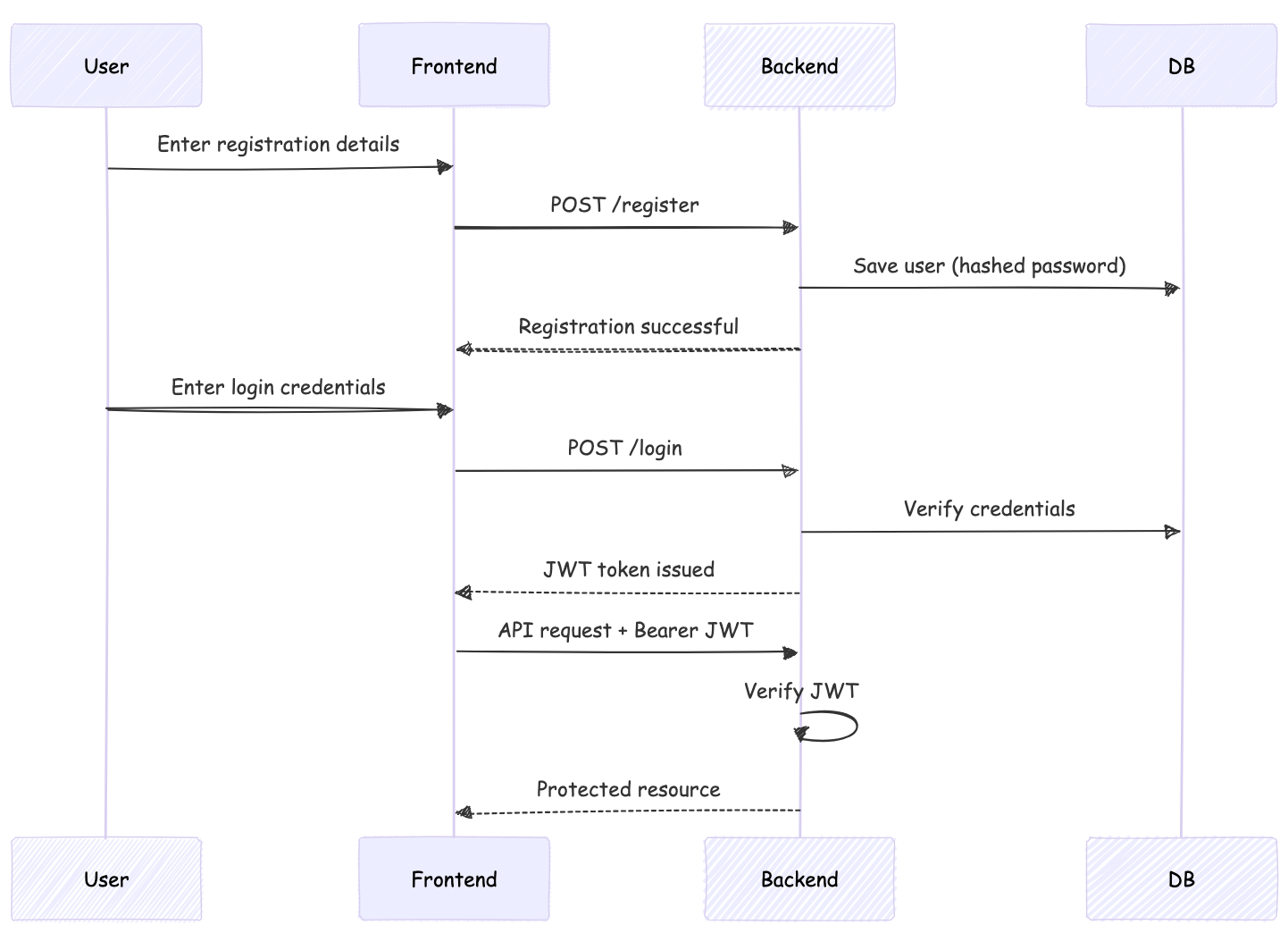
User request backend to access the resource by providing the username and password.
Backend checks in the database whether the provided credentials match or not.
If credentials are correct, generate a JWT token with payload, signature and expiry in the backend. Payload contains user info, roles, and authorization. Expiry duration should be provided explicitly for security. If that time passes, using the refresh token, we can generate a new token with a new expiry duration.
jwt.sign(payload, secret, { expiresIn: ‘1h’ }) – This is how the code used.
- By default, Auth0 has a 2-hour expiry time.
- OAuth2/Azure AD – default is 1h.
- Firebase has a 1h default expiry.
Client storage strategies (localStorage vs httpOnly cookies)
Now this is an actual JWT token, which is passed on to the frontend in the body response. Now the browser or device consumes this and store in localStorage, Session storage cookie. Avoid storing any user credentials in localStorage or sessionStorage, as an XSS script can steal data out of it. The best recommended method is to use Http-Only. In this, our server sends a Set-Cookie header, and the browser automatically stores it. JavaScript code cannot fetch this, hence we eliminate the XSS vulnerability. Cookie is marked with Http-Only: true. Now this stored token will be sent with each API request to the server.
Request authorization header format (Bearer token)
Now, when we request an API resource, we pass the JWT in the headers with Bearer: <token>
Why only Bearer and not Basic authentication? – So basic authentication consists of only username and password, and this is decoded at the server, which checks the data in the database based on this, and it gives either 200(Success) or 403(Unauthorized). On the other side Bearer Token consists of both authentication and authorization. So need not need to check into the DB.
JWT Token Structure
header.payload.signature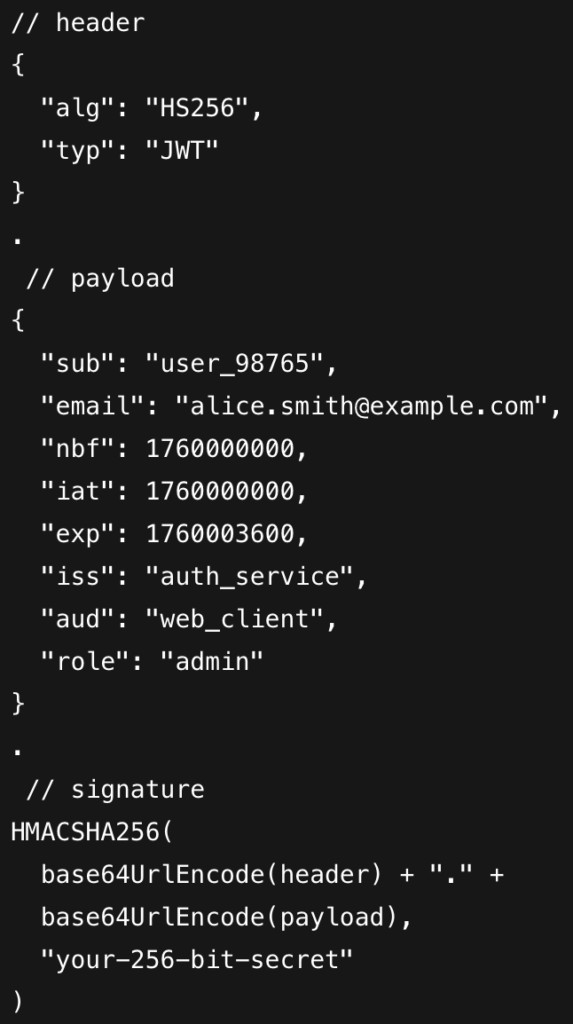
- Header: This included algorithm(HS256/RS256) used to sign the JWT.
- Payload: This contains the relevant data that a user wants to transmit to another. Token expiration, creation, and authorization are all these are encoded using Base64 within this.
- Here are the explanation of the keys used in payload:
- iat → when token was issued
- nbf → token usable after this time
- exp → token expiry
- iss & aud must match backend validation
- Here are the explanation of the keys used in payload:
- Signature: The signature takes the header and payload, enwraps/encodes these two using base64 and utilizes the signing algorithm mentioned in the header.
Security Best Practices
- Never store sensitive data in JWT payload
- If the token is leaked, access by unquthorized user can be granted, and misuse of resources may happen.
- None Algorithm
- If within the header if algorithm mentioned is none, the attacker can change the values within it and transmit the request. That is why the algorithm should be mentioned while encoding the data.
- Short expiration times + refresh token rotation
- Standard expiration time should be from a few minutes to an hour. As if in any worst case scenario occurs, like token leakage that will be hard to prevent authentication for at least that time. Now, when the token expiration occurs, to generate a new token refresh token is used. This refresh token is provided at the time of the first trip of the API authentication call.
Implementation Example
Node.js / Express – JWT Signing (jsonwebtoken)
import jwt from "jsonwebtoken";

export function signAccessToken(user) {
  return jwt.sign(
    { sub: user.id, role: user.role },
    process.env.JWT_SECRET,
    {
      expiresIn: "15m",
      issuer: "auth_service",
      audience: "web_client"
    }
  );
}
React – Token Persistence + API Interceptor (Axios)
Save token after login
localStorage.setItem("accessToken", token);Axios interceptor
import axios from "axios";

const api = axios.create({ baseURL: "/api" });

api.interceptors.request.use((config) => {
  const token = localStorage.getItem("accessToken");
  if (token) {
    config.headers.Authorization = `Bearer ${token}`;
  }
  return config;
});

export default api;
Refresh Token Pattern (Short & Clear)
Backend – issue refresh token
const refreshToken = jwt.sign(
  { sub: user.id },
  process.env.REFRESH_SECRET,
  { expiresIn: "7d" }
);
Frontend – refresh on 401
api.interceptors.response.use(
  res => res,
  async err => {
    if (err.response.status === 401) {
      const { data } = await axios.post("/refresh");
      localStorage.setItem("accessToken", data.accessToken);
      err.config.headers.Authorization = `Bearer ${data.accessToken}`;
      return api(err.config);
    }
    return Promise.reject(err);
  }
);
Logout Implementation
Expiration-Based Logout
localStorage.removeItem("accessToken")More secure way is to use the redis key with TTL(Time To Live) instead of localstorage.
Libraries recommended for JWT
| Language | Library | Download Link |
|---|---|---|
| Node.js | jsonwebtoken | LINK |
| Python | PyJWT | LINK |
| Java | jjwt | LINK |
| Go | golang-jwt/jwt | LINK |
| PHP | firebase/php-jwt | LINK |
| Ruby | jwt | LINK |
| Rust | jsonwebtoken | LINK |
| C# | System.IdentityModel.Tokens.Jwt | LINK |
Summary
- JWT Anatomy: Header.payload.signature breakdown (HS256/RS256) with Base64URL encoding
- Stateless Magic: Why servers verify tokens without database lookups vs traditional sticky sessions
- Practical Code:
jwt.sign()flows, Express middleware, React interceptors, refresh token rotation - Security Essentials: httpOnly cookies, 1-hour expiry, “none” algorithm attacks


Leave a Comment